.png)
Web accessibility: the essential guide for UK ecommerce
- Darren Burns
- Mar 27
- 8 min read


76% of disabled UK shoppers abandon purchases because of accessibility barriers on ecommerce sites. That is not a compliance statistic. That is lost revenue, walking out of your virtual door every single day. For UK and Irish ecommerce businesses, accessibility is no longer a nice-to-have bolted on after launch. It is a measurable business issue, a legal obligation, and a genuine competitive advantage. This guide gives you a clear, practical framework for understanding what accessibility means, where most sites fail, and exactly how to fix it.
Table of Contents
Key Takeaways
Point | Details |
Accessibility boosts sales | Accessible ecommerce sites attract more disabled shoppers and reduce abandoned baskets. |
Compliance is essential | Following WCAG standards and UK/Ireland laws protects your business from lawsuits and expands market reach. |
Easy fixes have big impact | Simple improvements like alt text, contrast, and keyboard navigation can significantly improve accessibility and user experience. |
Future-proof your site | Regular testing and keeping up with evolving standards ensure long-term accessibility and competitiveness. |
Accessibility improves SEO | Optimising for accessibility makes your site easier to find and promotes organic growth. |
What web accessibility means for ecommerce
Accessibility is often misunderstood as something that only affects a small minority of users. That assumption is expensive. Web accessibility is the practice of designing and developing websites so that people with disabilities can perceive, understand, navigate, and interact with them, following international standards like WCAG (Web Content Accessibility Guidelines). For ecommerce, this means every step of the buying journey, from browsing a product catalogue to completing checkout, must work for everyone.
Disabilities covered include visual impairments, hearing loss, motor difficulties, and cognitive conditions. But accessibility also covers temporary impairments, a broken wrist, bright sunlight on a screen, or a slow internet connection. When you build accessibly, you build for a far wider audience than you might initially assume.
Key areas where accessibility directly affects your shop:
Screen reader compatibility for visually impaired shoppers
Keyboard-only navigation for users who cannot use a mouse
Colour contrast for low-vision and colour-blind users
Captions and transcripts for deaf or hard-of-hearing customers
Clear, simple language for users with cognitive or learning differences
Publishing an accessibility statement on your site is also a recognised signal of commitment, both to users and to regulators.
Core principles and standards: WCAG, POUR, and current laws
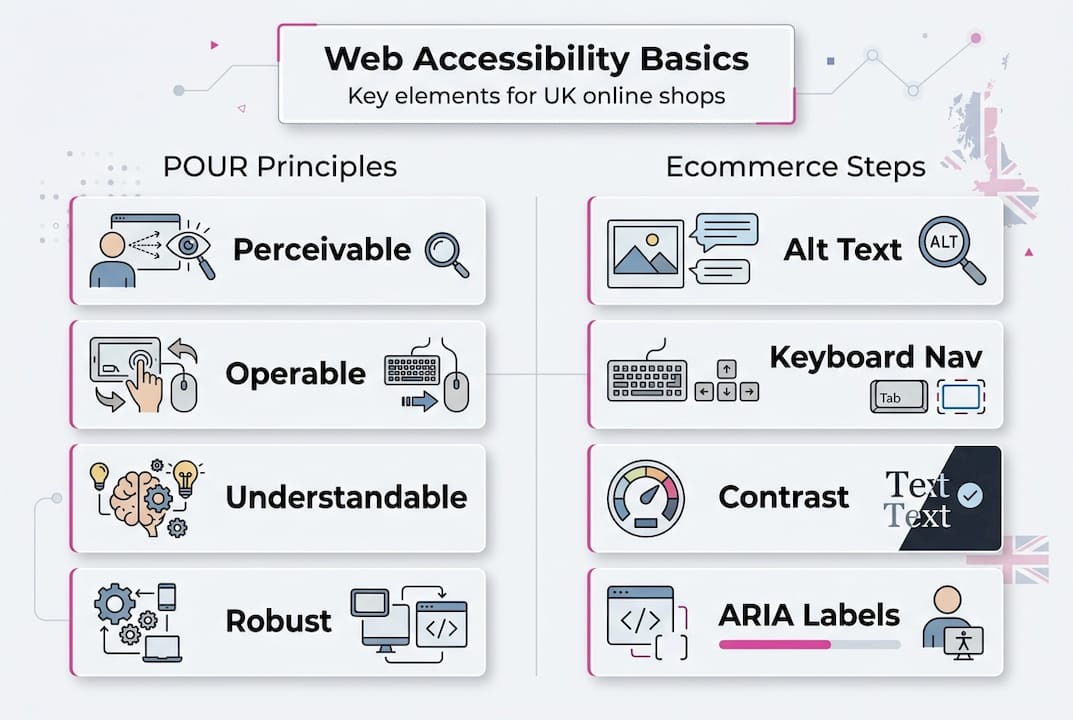
Understanding the framework behind accessibility standards removes a lot of the mystery. WCAG is structured around four core principles, known collectively as POUR.
Perceivable — Information and interface components must be presentable to users in ways they can perceive. Think alt text for images, captions for video.
Operable — All functionality must be operable via keyboard, not just a mouse. Navigation must not trap users.
Understandable — Content and interface behaviour must be predictable and readable. Error messages must be clear.
Robust — Content must be interpreted reliably by a wide range of assistive technologies, including screen readers and voice input tools.
WCAG 2.1 AA is the current benchmark for most UK and Irish ecommerce businesses. WCAG 2.2 was published in 2023 and adds nine new success criteria, particularly around mobile usability and cognitive accessibility.
Standard | Applies to | Key requirement |
WCAG 2.1 AA | All UK public-facing sites | Minimum accessibility compliance |
WCAG 2.2 AA | Recommended for all | Enhanced mobile and cognitive support |
EN 301 549 | EU/EAA exporters | European harmonised standard |
Equality Act 2010 | UK businesses | Reasonable adjustments required |
The Equality Act 2010 mandates reasonable adjustments for disabled users, and WCAG 2.1 AA is widely accepted as the benchmark for meeting that duty. If you sell into EU markets, the European Accessibility Act (EAA) applies from June 2025, requiring compliance with EN 301 549. Non-compliance risks legal action, reputational damage, and exclusion from significant market segments. Updating your accessibility statement to reflect your current compliance level is a straightforward first step.
Important: Ignorance of the law is not a defence. UK tribunals have already ruled against businesses that failed to make reasonable adjustments for disabled customers online.
Common accessibility barriers for ecommerce websites
The data on UK and Irish ecommerce accessibility is stark. 84% of UK retail homepages have WCAG 2.1 AA violations, and 76% of disabled shoppers abandon their baskets because of those barriers. These are not edge cases. They are systemic failures across the industry.

Ireland tells a similar story. 50% of Irish retailers score below 3 out of 5 on WCAG compliance assessments, and the UK’s disabled consumer market, often called the Purple Pound, is worth £274 billion annually. That is a market most ecommerce sites are actively excluding through poor design choices.
The most common barriers found across UK and Irish ecommerce sites:
Poor colour contrast between text and background, making content unreadable for low-vision users
Missing or meaningless alt text on product images, leaving screen reader users without context
Broken keyboard navigation, particularly at checkout, where focus traps or missing tab order block completion
Unlabelled form fields, causing confusion for assistive technology users
Auto-playing video or audio with no way to pause or mute
Inaccessible pop-ups and modals that cannot be dismissed via keyboard
Barrier | Users affected | Business impact |
Poor colour contrast | Low-vision, colour-blind | High bounce rate |
Missing alt text | Screen reader users | Lost product discovery |
Broken keyboard nav | Motor impaired users | Checkout abandonment |
Unlabelled forms | Assistive tech users | Failed transactions |
These issues directly affect your ability to boost online sales. An ADA compliant accessibility page is one practical example of how leading brands signal their commitment publicly.
Practical accessibility techniques and tools
Fixing accessibility does not require a complete rebuild. Most improvements are targeted, measurable, and achievable in sprints. The key is knowing where to start.
Semantic HTML is the foundation. Using the correct HTML elements, headings, buttons, lists, and landmarks, means assistive technologies can interpret your pages accurately. A "element behaves correctly for keyboard and screen reader users. A` styled to look like a button does not.
Here is a practical sequence for your first accessibility sprint:
Run an automated audit using tools like Axe, WAVE, or Lighthouse. These catch roughly 30 to 40% of issues automatically.
Check colour contrast using the WebAIM Contrast Checker. Body text needs a 4.5:1 ratio; large text needs 3:1.
Add descriptive alt text to all product images. Describe what is shown, not just the product name.
Test keyboard navigation by unplugging your mouse and tabbing through your entire checkout flow.
Audit form labels to ensure every input field has a visible, associated label.
Test with a screen reader such as NVDA (free, Windows) or VoiceOver (built into Mac and iOS).
Text alternatives, keyboard navigation, contrast, captions, and ARIA labels are the mechanics that make POUR principles real in your codebase. ARIA (Accessible Rich Internet Applications) attributes fill gaps where HTML alone cannot convey enough context to assistive technologies.
Pro Tip: Do not rely solely on automated tools. They miss approximately 60% of real-world accessibility issues. Combine automated scans with manual keyboard testing and at least one session with a real screen reader user.
For a broader view of how these fixes connect to overall site performance, the website optimisation checklist covers accessibility alongside speed and UX improvements. Accessibility and semantic search are also closely linked, as structured, meaningful content benefits both disabled users and search engine crawlers.
Expert perspective: grey areas, evolving standards, and future-proofing
Accessibility is not always black and white. Edge cases include keyboard shortcut conflicts with browser defaults, visually hidden text that helps screen readers but confuses sighted users, sensory-based instructions like “click the green button”, and dark mode implementations that may actually worsen readability for some dyslexic users. These situations require judgement, not just rule-following.
The standards themselves are also moving. WCAG 3.0 is currently in draft, with a 2026 target for further development. It introduces outcome-based guidelines and a bronze, silver, and gold conformance model, replacing the current A, AA, AAA structure. It is a significant shift in how compliance will be measured.
For now, the practical advice is clear:
Stick to WCAG 2.2 AA as your current compliance target
Monitor WCAG 3.0 drafts but do not restructure your site around them yet
Test with real disabled users at least once per quarter, not just automated tools
Document your accessibility decisions, including known issues and planned fixes
Treat accessibility as an ongoing process, not a one-time audit
Pro Tip: Accessibility improvements often overlap directly with SEO fundamentals. Clean heading structures, descriptive link text, and fast load times serve both disabled users and search engine crawlers simultaneously. Understanding why SEO investment pays off becomes much clearer when you see how accessibility and search visibility reinforce each other.
Business benefits: accessibility as a driver of sales, loyalty, and SEO
Accessibility is not a cost centre. It is a revenue strategy. Prioritising WCAG 2.1/2.2 AA compliance through auditing pages, fixing contrast, labels, and navigation directly benefits UX, SEO, legal protection, and access to the £274 billion disabled consumer market.
The business case is straightforward:
Wider market reach: 16 million disabled people in the UK alone represent a substantial, underserved customer base
Reduced legal risk: Proactive compliance is far cheaper than defending an Equality Act claim
Improved SEO: Accessible sites have cleaner code, better structured content, and faster load times, all of which search engines reward
Higher conversion rates: Removing friction for disabled users removes friction for everyone, improving overall checkout completion
Brand loyalty: Customers who feel included return. Accessibility signals that your brand respects all shoppers
The digital inclusion approach adopted by forward-thinking organisations shows that accessibility is increasingly expected, not exceptional. Staying ahead of ecommerce SEO trends means recognising that accessible design and search visibility are converging, not competing.
Take the next step: support for your ecommerce accessibility journey
Accessibility improvements compound over time. Each fix you make reduces abandonment, improves rankings, and strengthens your legal position. The challenge is knowing where to start and having the right support to do it properly.

At I Want To Be Seen, we work with UK and Irish ecommerce businesses to audit, fix, and future-proof their digital presence, covering accessibility alongside SEO, PPC, and AI-driven growth strategies. With over 25 years of experience scaling ecommerce brands, we understand that accessibility is not a separate workstream. It is woven into everything that makes a site perform. Start by reviewing our accessibility statement to see the standard we hold ourselves to, then get in touch to discuss an audit for your store.
Frequently asked questions
What is WCAG and why is it important for ecommerce owners?
WCAG is the global standard for web accessibility, built around the POUR principles, and it is essential for UK and Irish ecommerce owners because it defines the legal and commercial benchmark for serving disabled shoppers.
Are UK ecommerce sites legally required to meet accessibility standards?
Yes. The Equality Act 2010 requires reasonable adjustments for disabled users, and failing WCAG 2.1 AA compliance can expose your business to legal claims and loss of market access.
What are the quickest ways to start improving website accessibility?
Audit your homepage with a free tool like Axe or WAVE, add descriptive alt text to product images, fix colour contrast ratios, and test keyboard navigation through your entire checkout flow without using a mouse.
Will meeting accessibility standards also boost my SEO?
Accessible sites are favoured by search engines because clean semantic code, descriptive content, and fast load times align directly with what Google rewards, making accessibility a genuine SEO asset.
How can ecommerce owners future-proof against changing accessibility rules?
Follow WCAG 2.2 AA now, keep an eye on WCAG 3.0 drafts expected to develop further in 2026, and schedule regular testing sessions with real disabled users to catch issues automated tools miss.
Recommended
Comments