.png)
Tracking pixels for e-commerce: a clear guide
- Darren Burns
- May 1
- 10 min read


TL;DR:
Tracking pixels collect user activity data essential for e-commerce campaign measurement and optimization.
Tracking pixels are invisible by design, but their impact on your marketing results is anything but subtle. Many e-commerce marketing managers treat them as a simple “set and forget” tool, yet the reality is far more nuanced. A misconfigured pixel can silently drain your ad budget, a missed consent step can expose you to regulatory penalties, and a platform update can wipe out weeks of conversion data overnight. This guide cuts through the confusion to give you a practical, compliance-aware understanding of how tracking pixels work, where they fail, and how to use them to genuinely improve your customer targeting and return on ad spend.
Table of Contents
Key Takeaways
Point | Details |
Tracking pixels are invisible tools | They silently capture vital user actions, powering everything from remarketing to ROI analysis. |
Multiple pixel types exist | Knowing the difference between page-view, conversion, retargeting, and analytics pixels is essential for effective campaigns. |
Implementation pitfalls | Express checkouts and consent blockers can cause significant data loss if not managed proactively. |
Strict consent rules apply | PECR requires explicit user opt-in for tracking in the UK and Ireland before any pixel can activate. |
Human judgement is vital | Smart marketers regularly review and triangulate pixel data with other analytics for truly informed decisions. |
What is a tracking pixel and how does it work?
At its most basic, a tracking pixel is a piece of code that fires when a user takes a specific action, such as visiting a page, clicking a link, or completing a purchase. Tracking pixels are code snippets embedded in web pages or emails that collect information on user activity. The “pixel” name comes from the original format: a 1x1 transparent image that loaded invisibly in the background, sending data back to a server. Modern pixels are often pure JavaScript, but the principle remains the same.
When a user lands on your product page, the pixel fires and sends a data packet to the relevant platform, whether that is Meta, Google, TikTok, or your own analytics system. That packet typically includes:
Device type (mobile, desktop, tablet)
Browser and operating system
IP address and approximate location
Timestamp of the visit or action
URL of the page visited
Specific events such as “add to cart,” “initiate checkout,” or “purchase”
This data is what connects a user’s journey across your site to your advertising campaigns. Without it, you are essentially flying blind. You might know that 500 people clicked your Meta ad, but you would have no idea how many of them actually bought something. The retargeting pixel impact on campaign ROI is well documented, and it begins with this fundamental data collection loop.
“Most users will never see a tracking pixel, but its data can make or break a campaign’s return on investment.”
Pixels are typically embedded on product pages, category pages, the checkout flow, and the order confirmation page. They are also embedded in marketing emails, where they track whether a recipient opened the message and which links they clicked.
Types of tracking pixels used in e-commerce
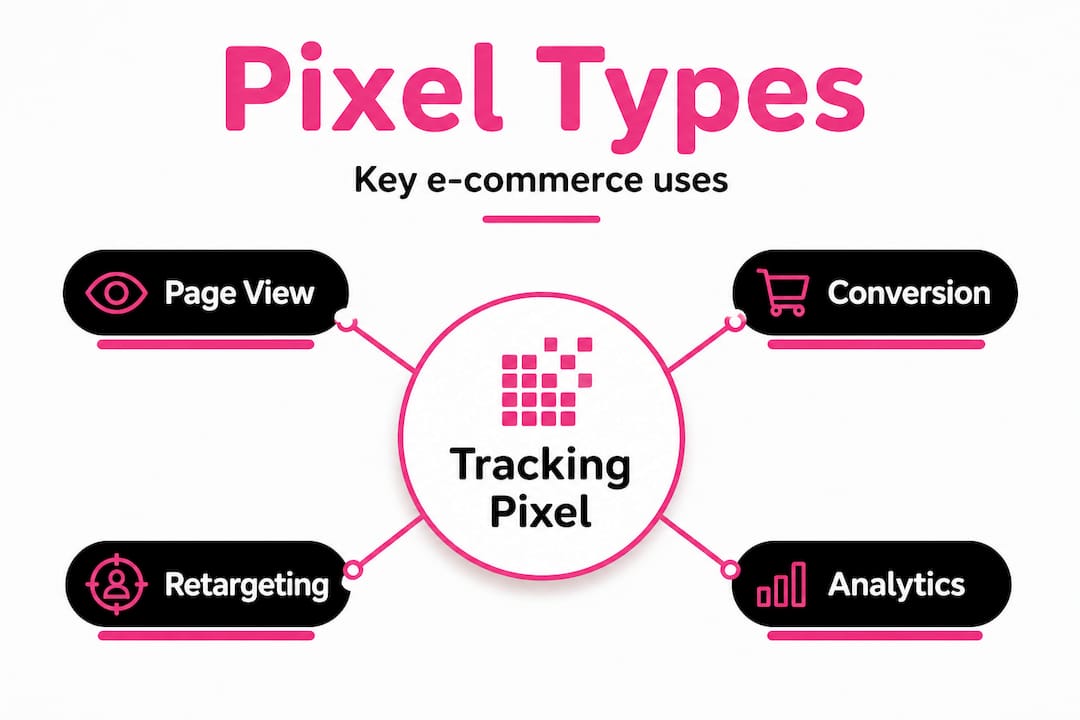
Not all pixels do the same job. Understanding the distinctions helps you deploy them strategically rather than scattering them across your site without purpose. Types include page-view pixels, conversion pixels, retargeting pixels, analytics pixels, and email pixels, each serving a distinct function in your marketing stack.
Pixel type | Primary function | Typical placement | Example platform |
Page-view pixel | Counts every site visitor | All pages | Google Analytics |
Conversion pixel | Records purchases or form completions | Order confirmation page | Meta, Google Ads |
Retargeting pixel | Builds audience segments for ads | Product and category pages | Meta, TikTok, Criteo |
Analytics pixel | Monitors engagement and behaviour | Site-wide | Hotjar, Mixpanel |
Email pixel | Tracks opens and link clicks | Marketing emails | Klaviyo, Mailchimp |
Page-view pixels give you the raw traffic picture. They tell you how many people visited, from where, and on what device. Useful, but limited on their own.
Conversion pixels are where the real commercial value lies. When a user completes a purchase and the order confirmation page loads, the pixel fires and attributes that sale back to the ad or channel that drove it. This is the data your PPC team relies on to optimise bids and allocate budget.

Retargeting pixels are arguably the most powerful tool in the e-commerce marketer’s kit. They tag visitors who did not convert and allow you to serve them targeted ads across other platforms. Understanding retargeting basics is essential before deploying these, because poor audience segmentation leads to wasted spend and audience fatigue. For stores with large product catalogues, dynamic remarketing takes this further by automatically serving ads featuring the exact products a user viewed.
Analytics pixels from tools like Hotjar or Microsoft Clarity record session replays and heatmaps, giving you qualitative insight into how users interact with your pages. These are invaluable for conversion rate optimisation.
Email pixels track whether recipients opened your campaigns and which links they clicked. However, as we will explore shortly, their reliability has been significantly compromised by recent platform changes.
Pro Tip: Always document which pixels you deploy on which pages, including the platform, pixel ID, and the events they are configured to fire. A simple shared spreadsheet prevents duplicate data, makes audits faster, and is essential when onboarding new team members or agencies.
Common challenges and pitfalls with tracking pixels
Understanding pixel types sets the foundation, but running campaigns means confronting the many pitfalls pixels introduce. Even a well-planned pixel deployment can unravel quickly due to technical edge cases, user behaviour, and platform changes.
One of the most significant and underreported issues is pixel failure at express checkouts. Pixels often fail on express checkouts operating on external domains, and research suggests 51.9% of stores experience missing conversion data when customers use Shop Pay or Apple Pay. These payment methods redirect users to an external domain to complete the transaction, and if your pixel is not configured to fire across that handoff, the sale simply disappears from your reports. Your ad platform thinks the campaign failed. Your budget gets reallocated away from a channel that was actually working.
Other common pitfalls include:
Issue | Impact | Solution |
Consent rejection | Pixel does not fire; data gap | Use a CMP; model missing data |
iOS App Tracking Transparency decline | Reduced audience matching | Use aggregated event measurement |
Apple Mail Privacy Protection | Inflated email open rates | Shift focus to click-through rates |
Duplicate pixel installs | Inflated conversion counts | Audit via browser tag manager tools |
Pixel fires on wrong page | Incorrect attribution | QA every pixel event individually |
Apple’s Mail Privacy Protection (MPP) deserves special attention. Introduced in 2021 and now deeply embedded in user behaviour, MPP preloads email images automatically, including the tracking pixel, regardless of whether the user actually opened the email. This means your reported open rates may be significantly inflated. Relying on open rates as a key performance indicator for email campaigns is now unreliable for a substantial portion of your audience.
Here is a practical troubleshooting process for pixel issues:
Install the Meta Pixel Helper or Tag Assistant browser extension to verify pixels are firing correctly on each page.
Use Google Tag Manager’s preview mode to check that tags are triggering on the correct events.
Cross-reference your pixel-reported conversions against your Shopify or WooCommerce order data to identify discrepancies.
Check your consent management platform logs to understand what percentage of users are opting out of tracking.
Test your checkout flow end-to-end, including express checkout options, to confirm conversion pixels fire at every exit point.
Review your tracking conversions setup quarterly, not just at launch.
Monitoring your essential marketing metrics alongside pixel data helps you spot anomalies before they distort your campaign decisions.
Pro Tip: Set up a recurring calendar reminder every quarter to audit your pixel configuration, especially after any site updates, new payment provider integrations, or changes to your checkout flow. Platforms update their requirements regularly, and a pixel that worked perfectly six months ago may now be silently failing.
Legal requirements and compliance in the UK and Ireland
Pixel failure can hurt your data, but legal missteps can cost far more. In the UK and Ireland, tracking pixels are not a grey area. The rules are clear, and the consequences of getting them wrong are real.
PECR requires explicit consent for tracking pixels before they fire. This is not simply a GDPR consideration. The Privacy and Electronic Communications Regulations (PECR) apply specifically to technologies that access or store information on a user’s device, which includes tracking pixels. The ICO treats pixels in the same category as cookies, meaning the same consent rules apply.
Key compliance requirements for UK and Irish e-commerce managers:
Explicit opt-in is required before any tracking pixel fires. Pre-ticked boxes or implied consent are not sufficient.
Consent must be granular. A user’s agreement to receive your marketing emails does not constitute consent to be tracked by a retargeting pixel. These are separate permissions.
Users must be informed about which pixels are active, what data they collect, and who receives that data, including third-party platforms like Meta or Google.
A consent management platform (CMP) must be used to block pixels from firing until the user has actively opted in.
Consent records must be stored, including what the user was shown, when they consented, and which version of your privacy notice was in place at that time.
“Consent for tracking must be separate from consent for marketing emails. These are distinct legal bases and cannot be bundled together.”
The penalties for non-compliance extend beyond ICO fines. Reputational damage, loss of customer trust, and the operational disruption of a regulatory investigation all carry significant business cost. Building a compliant ad strategy from the ground up is far less costly than retrofitting compliance after the fact.
Unlocking pixel-driven measurement and customer targeting
With compliance in hand, it is time to make tracking pixels work harder for your marketing objectives. When deployed correctly, pixels transform your advertising from broad-reach guesswork into precise, data-driven targeting.
End-to-end campaign measurement starts with ensuring every stage of the funnel has a corresponding pixel event. A user sees your ad, lands on a product page (page-view pixel fires), adds to cart (add-to-cart event fires), and completes the purchase (conversion pixel fires). Each step gives your ad platform the signal it needs to optimise delivery toward users most likely to convert. Retargeting pixels for audiences and conversion pixels for tracking purchases are best used together with robust consent management in place.
Building audience segments is where pixel data becomes genuinely powerful. You can create audiences of users who viewed a specific product category but did not purchase, users who abandoned checkout, or users who purchased once but have not returned in 90 days. Each segment warrants a different message and a different bid strategy.
Here are the next steps you can implement this quarter:
Audit your current pixel setup using Tag Manager and platform-native diagnostic tools.
Map every pixel event to a specific stage in your customer journey and confirm each fires correctly.
Review your CMP configuration to ensure pixels are blocked until consent is granted.
Create at least three retargeting audiences based on funnel stage: product viewers, cart abandoners, and past purchasers.
Shift email reporting away from open rates toward click-through rates and revenue attributed to campaigns.
Set up remarketing for conversions with tailored creative for each audience segment.
Review your remarketing setup to ensure your pixel audiences are populating correctly before launching paid campaigns.
Optimising ad spend based on accurate conversion data means your budget flows toward the campaigns, audiences, and creatives that demonstrably drive revenue, not just clicks.
The uncomfortable truth about pixel-based marketing
After 25 years of scaling e-commerce brands, we have watched businesses make the same mistake repeatedly: they treat pixel data as ground truth. They see a cost per acquisition figure in their Meta dashboard and make six-figure budget decisions based on it, without questioning whether that number is accurate.
The reality is that pixel data is always partial. Consent opt-outs, iOS restrictions, browser extensions, and express checkout failures all create gaps. The platforms themselves acknowledge this, which is why Meta introduced Conversions API and Google introduced enhanced conversions. These server-side solutions help, but they do not eliminate the problem entirely.
The marketers who consistently outperform their competitors are not the ones with the most pixels. They are the ones who triangulate. They compare pixel-reported conversions against their actual order management data. They look at measuring campaign performance through multiple lenses, including direct customer surveys, post-purchase attribution questions, and cohort analysis. They treat pixel data as one important input, not the final word.
Regular audits are not optional. Platform rules change, consent rates fluctuate, and new payment methods introduce new tracking gaps constantly. The brands that build systematic review processes into their marketing operations are the ones that catch problems before they distort strategy. Human judgement, applied to imperfect data, consistently outperforms blind reliance on dashboards.
Next steps: mastering tracking pixels with expert support
Getting tracking pixels right requires both technical precision and strategic oversight. If your pixel setup has grown organically over time, with different team members or agencies adding tags without a unified plan, the chances are high that you have gaps, duplicates, or compliance risks you are not yet aware of.

At I Want To Be Seen, we have spent over 25 years building and scaling e-commerce brands, which means we understand exactly where pixel deployments go wrong and how to fix them. Our team specialises in SEO, PPC, and data-driven digital marketing for e-commerce businesses across the UK and Ireland. Whether you need a full pixel audit, a compliant consent management setup, or a remarketing strategy built on clean, reliable data, we can help you build a tracking infrastructure that actually supports your growth objectives rather than quietly undermining them.
Frequently asked questions
Can a tracking pixel collect personal data from website users?
Yes, tracking pixels collect personal data such as IP addresses and browsing behaviour, which is why they fall under PECR and GDPR regulation in the UK and Ireland.
Are tracking pixels legal in the UK and Ireland?
Yes, but only when used correctly. PECR requires explicit consent before any tracking pixel fires, and non-compliant use can result in regulatory action from the ICO.
What happens if a user declines consent for tracking pixels?
Pixels blocked by consent rejection do not fire and collect no data, which creates gaps in your campaign reporting and may reduce the accuracy of your conversion tracking.
Can tracking pixels work on express checkouts like Shop Pay or Apple Pay?
Often not reliably. Pixels frequently fail on express checkouts that operate on external domains, meaning purchases completed through these methods may not appear in your ad platform reports.
Why do my email open rates seem higher than expected after 2025?
Apple MPP preloads email images automatically, including tracking pixels, regardless of whether the recipient actually opened the email, which artificially inflates reported open rates.
Recommended
Comments